> For the complete documentation index, see [llms.txt](https://docs.testfiesta.com/llms.txt). Markdown versions of documentation pages are available by appending `.md` to page URLs; this page is available as [Markdown](https://docs.testfiesta.com/projects-tab/test-plans-tab/table-view-and-changing-columns.md).
# Table View and Changing Columns
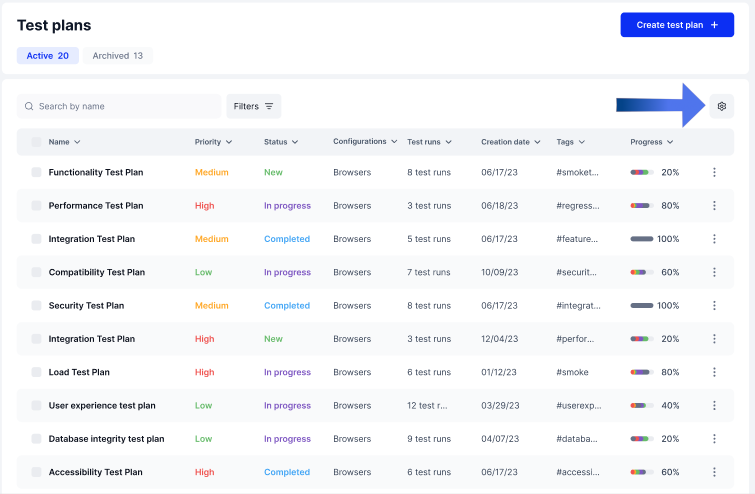
Test plans are set up in Table view with a list of customizable columns that users can change based on their preferences and needs.
## Columns
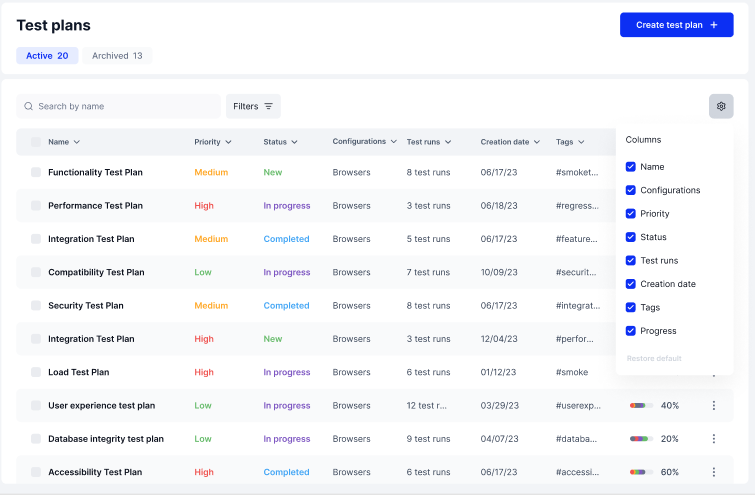
By default, the columns for Test Plans include the Name, Configurations, Priority, Status, Test runs, Creation date, Tags, and Progress. Each column can be added or removed as required.
## Editing Columns
Step 1: Click the Cog wheel icon
This will open up the list of columns options and checkboxes
Step 2: Choose from Column options
You can add or remove any column by checking or unchecking each checkbox beside the options. The chosen options will appear on the table view.
You can also filter your Test Plan list to find the specific one you need at any given time. Click "Next" to find out how.