# Milestones Tab

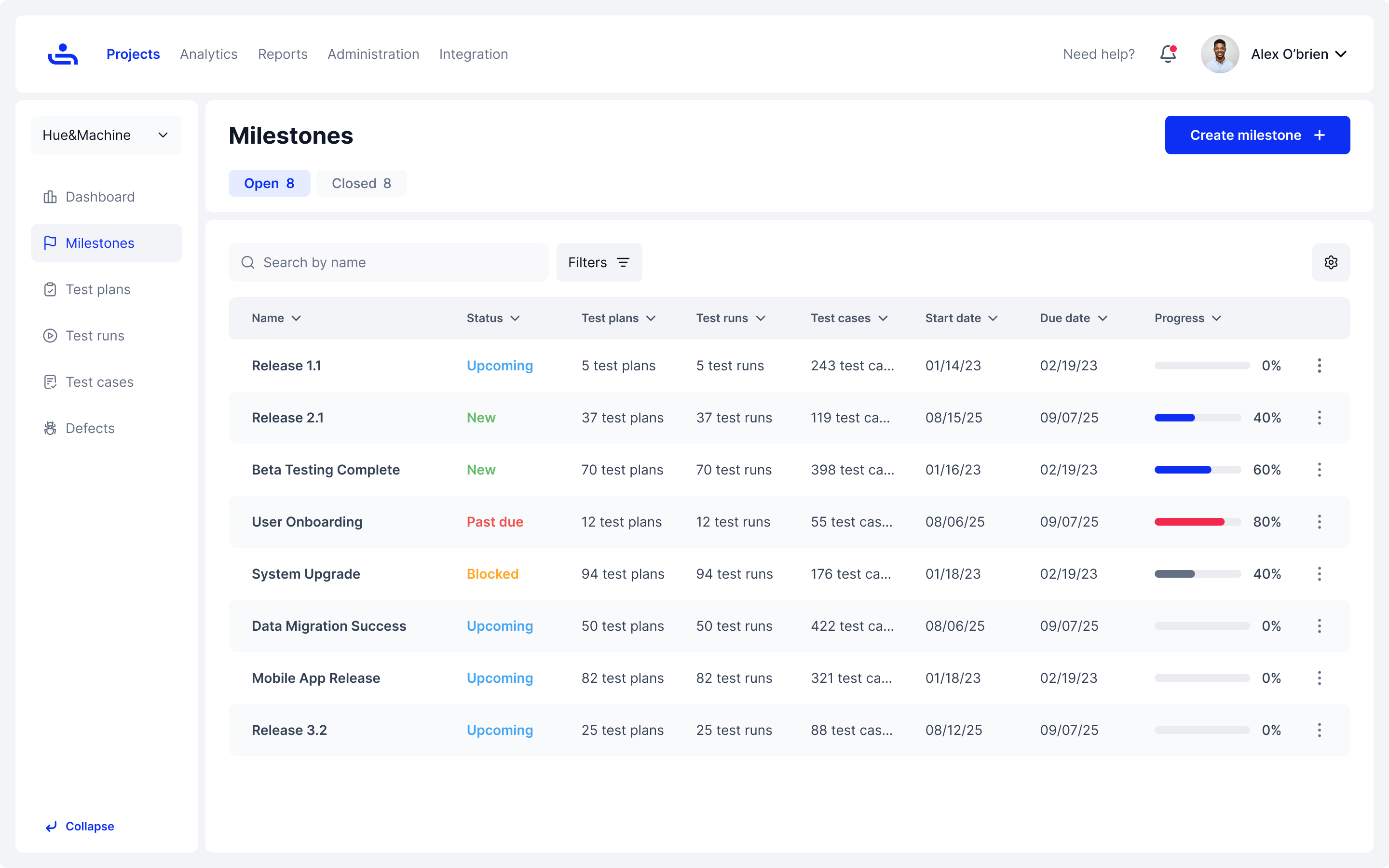
Milestones allow Organizations to sort Test Runs & Test Plans in a way that makes it easier to see completion progress in relation to a specific deadline or requirement. When this happens it will notify other users of its status so everyone is on the same page.

<figure><img src="https://1326643208-files.gitbook.io/~/files/v0/b/gitbook-x-prod.appspot.com/o/spaces%2FnpMhTPhBTwVaw7bZVBjY%2Fuploads%2Fgit-blob-a161853bd64b385211a53fe2072a2644a5fa6d3c%2F295_Milestones%2001_Milestones%20-%20Open%20-%20expanded%20menu.png?alt=media" alt=""><figcaption><p>Example of the Milestones homepage.</p></figcaption></figure>

***

If you would like to jump to a specific section, choose from the topics below to get started:

<table data-view="cards"><thead><tr><th></th><th></th><th></th><th data-hidden data-type="files"></th><th data-hidden data-card-target data-type="content-ref"></th><th data-hidden data-card-cover data-type="files"></th></tr></thead><tbody><tr><td>Columns In The Milestones Tab</td><td></td><td>Learn what column information is available in your table view.</td><td><a href="https://1326643208-files.gitbook.io/~/files/v0/b/gitbook-x-prod.appspot.com/o/spaces%2FnpMhTPhBTwVaw7bZVBjY%2Fuploads%2Fgit-blob-738bd340ea8cc685489a6f0701758a4aaa475651%2FTest%20Fiesta%20Logo.PNG?alt=media">Test Fiesta Logo.PNG</a></td><td><a href="milestones-tab/columns-in-the-milestones-tab">columns-in-the-milestones-tab</a></td><td><a href="https://1326643208-files.gitbook.io/~/files/v0/b/gitbook-x-prod.appspot.com/o/spaces%2FnpMhTPhBTwVaw7bZVBjY%2Fuploads%2Fgit-blob-738bd340ea8cc685489a6f0701758a4aaa475651%2FTest%20Fiesta%20Logo.PNG?alt=media">Test Fiesta Logo.PNG</a></td></tr><tr><td>Open Vs Closed Milestones</td><td></td><td>Discover the differences between Open &#x26; Closed Milestones</td><td></td><td><a href="milestones-tab/open-vs-closed-milestones">open-vs-closed-milestones</a></td><td><a href="https://1326643208-files.gitbook.io/~/files/v0/b/gitbook-x-prod.appspot.com/o/spaces%2FnpMhTPhBTwVaw7bZVBjY%2Fuploads%2Fgit-blob-738bd340ea8cc685489a6f0701758a4aaa475651%2FTest%20Fiesta%20Logo.PNG?alt=media">Test Fiesta Logo.PNG</a></td></tr><tr><td>Creating Milestones</td><td></td><td>Learn how to create Milestones and track your progress!</td><td></td><td><a href="milestones-tab/creating-milestones">creating-milestones</a></td><td><a href="https://1326643208-files.gitbook.io/~/files/v0/b/gitbook-x-prod.appspot.com/o/spaces%2FnpMhTPhBTwVaw7bZVBjY%2Fuploads%2Fgit-blob-738bd340ea8cc685489a6f0701758a4aaa475651%2FTest%20Fiesta%20Logo.PNG?alt=media">Test Fiesta Logo.PNG</a></td></tr><tr><td>Deleting Milestones</td><td></td><td>Learn the facets of deleting Milestones here.</td><td></td><td><a href="milestones-tab/deleting-milestones">deleting-milestones</a></td><td><a href="https://1326643208-files.gitbook.io/~/files/v0/b/gitbook-x-prod.appspot.com/o/spaces%2FnpMhTPhBTwVaw7bZVBjY%2Fuploads%2Fgit-blob-738bd340ea8cc685489a6f0701758a4aaa475651%2FTest%20Fiesta%20Logo.PNG?alt=media">Test Fiesta Logo.PNG</a></td></tr><tr><td>Filtering Milestones</td><td></td><td>Filter your Milestones to find Milestones easily.</td><td></td><td><a href="milestones-tab/filtering-milestones">filtering-milestones</a></td><td><a href="https://1326643208-files.gitbook.io/~/files/v0/b/gitbook-x-prod.appspot.com/o/spaces%2FnpMhTPhBTwVaw7bZVBjY%2Fuploads%2Fgit-blob-738bd340ea8cc685489a6f0701758a4aaa475651%2FTest%20Fiesta%20Logo.PNG?alt=media">Test Fiesta Logo.PNG</a></td></tr><tr><td>Editing Milestones</td><td></td><td>Edit your Milestones &#x26; tailor them to your needs.</td><td></td><td><a href="milestones-tab/editing-milestones">editing-milestones</a></td><td><a href="https://1326643208-files.gitbook.io/~/files/v0/b/gitbook-x-prod.appspot.com/o/spaces%2FnpMhTPhBTwVaw7bZVBjY%2Fuploads%2Fgit-blob-738bd340ea8cc685489a6f0701758a4aaa475651%2FTest%20Fiesta%20Logo.PNG?alt=media">Test Fiesta Logo.PNG</a></td></tr></tbody></table>

***

There is a lot to learn in the Milestone Tab, but let's start small. The upcoming page will discuss the information columns you can adjust. Click "Next"